

Table of Contents
What Is a Canonical Issue
Canonical issues are crucial as they confuse Google when content appears across multiple web pages that include identical information. Without Google knowing which page should rank higher in search results, your website’s SEO power could become dispersed across many weak pages that make up its entirety – therefore decreasing rankings. By targeting one particular site through their algorithm instead, however, Google focuses its power towards helping it rank higher and get more visitors than before.
As people become less trusting of you and search engines choose the wrong page to display, traffic may decrease as customers avoid your company altogether. A canonical tag helps search engines understand which is your main and original one so SEO remains strong and clear.
Why Canonical Issue not Good
Canonical issues can be detrimental to SEO because they confuse search engines. When the same content exists on multiple URLs, Google becomes confused as to which version should appear in search results, leading to traffic loss as Google skips over or lowers rankings of vital pages – your SEO value becomes spread among multiple pages instead of focused onto one solid one and your rankings suffer accordingly in Google searches results.
Canonical issues on your site can lead to duplicate content appearing across many pages and confuse Google, as search engines strive to display only original or compelling information; search engines might instead opt for your similar-looking pages over individual pieces; meaning your desired search result won’t show up where expected and authority and backlinks could get spread among all duplicate pages, making it harder for any one page to rank well on Google.
Common Reason For Canonical Issue
Canonical issues arise when your website shows the same or very similar content at different URLs, often caused by URL parameters like filters, tracking codes or search queries. Another potential cause could include having both non-WWW versions as well as HTTP and HTTPS versions for one page – an issue which confuses search engines and can damage SEO efforts if left unaddressed.
Sometimes websites display pages differently for search engines such as with and without www, as well as extra codes like?re=ad. These different versions all appear to display identical content which causes confusion for Google; without an accurate canonical tag in place Google won’t know which page should be treated as primary and this makes your website harder for users to locate on Google.
Fixing Canonical Issues
To address canonical errors on your website, it’s first necessary to identify which pages display similar or duplicate content. Google Search Console or SEO software can help identify duplicated pages; once discovered, determine which one should be the official canonical page by selecting which version from their list as canonical page(s).
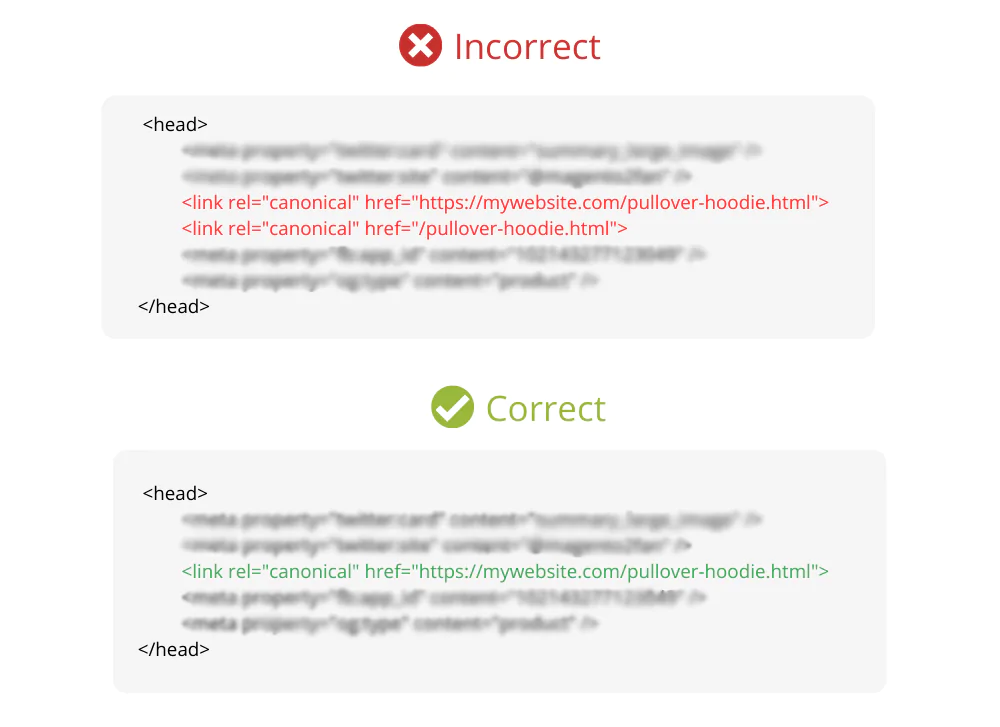
Subsequently, it’s necessary to place a canonical tag within duplicate pages that notify search engines that this content should be followed instead of duplicate versions; this allows Google to know which page should be seen as original content and should therefore follow it instead of following duplicate versions of pages that do not look alike. This tag tells search engines which one is the original page (ie “This content should follow its source instead”.). It looks something like this.
If there are pages you don’t want people landing directly, using 301 redirects will allow for automatic navigation to the correct pages. Be sure to also double check that internal links point towards their main versions.
Format for writing canonical tag
<link rel=”canonical” href=”website/pageorpost/”>
Eg:<link rel=”canonical” href=”godigibuild.com/home/”>
How to Avoid Canonical Issues
To prevent canonical issues on your website, it’s crucial to keep its content organized and uncluttered.
Select one main page with an URL tag telling search engines which version they should show when searchers visit; ensure there aren’t duplicate URLs such as example.com/page and example.com/page?ref=abc that show similar material; always link directly back to original versions instead of duplicate versions and avoid duplicating versions; this simple habit will ensure search engines easily understand and rank your website properly.
Putting into practice these simple habits will keep your content uncluttered, organized and search engines understand it too – helping keep search engines understand and rank sites effectively by search engines themselves
- Avoid Duplicate Content: It is best not to create duplicate content by copy-pasting similar text on multiple web pages; search engines could become confused between pages which look alike and write unique material for each of them – using canonical tags as needed, to indicate which page should take priority in search engine ranking results.
- Select One URL Format Only:Stick with only one version of your site-either: http: or https:
- Set Up 301 Redirects: When your page becomes outdated or unnecessary, use 301 redirects to direct visitors and Google to its correct destination page.
- Internal Links Should Point Directly : Your internal website links such as buttons and menu items should point directly to their canonical version; avoid linking to pages which duplicate content, are different URLs altogether or contain tracking codes in their URIs.
- Avoid URL Parameters If Not Needed: Extra parameters, like?ref=abc and?sort=price, can make pages seem different from one another. If there are extra parameters that alter their appearance on pages that look the same to you, remove them if unnecessary and use canonical tags to point back towards their main version as needed.
- Use SEO Tools To Evaluate Issues
- Google Search Console and Yoast SEO plugins (WordPress) can both help identify problems.
- Screaming Frog for WordPress (SFfP) offers tools that allow users to locate duplicate pages and canonical tags that have gone untagged, thus helping to detect duplicated or mislabeled posts on websites.
Canonical In Brief
Canonical issues arise when websites contain multiple URLs linking to content with identical or nearly identical features, making search engines struggle with selecting their preferred version and decreasing visibility and possibly ranking positions as search engines may split link equity or index the wrong page.
Canonicalization errors have the potential of decreasing site visibility while potentially lower rankings as search engines may index different versions incorrectly or index duplicate pages incorrectly.
In simpler terms: Imagine having multiple doors to the same room. Search engines, like visitors, get confused about which door to use to reach the room’s content. This confusion can dilute the importance of the room (your content) in search results.
Do check our other Blogs
Website : Godigibuild
Instagram : Godigibuild